Step-by-step guides for site and plant work
Put theprocedure onthe machine.
Subtilitas turns your safe working procedures into short guides behind a QR code. A worker scans the code on the machine, follows one step at a time with a photo or video, and signs off at the end. You get a record of every job.
01 Why it matters
Most procedures live in a folder in the site office, a long way from the job.
On site, people work from memory. Steps get missed and new starters guess. When an inspector asks who checked the machine before it was used, the answer is on a scrap of paper, if it was written down at all.
Subtilitas moves the procedure to where the work happens, and keeps a record each time someone follows it.
| In the folder | On the machine |
|---|---|
| Read once, at induction | In front of the worker as they do the job |
| Pages of small print | One short step per screen, with a photo or video |
| A tick sheet in a drawer | A signed-off record with name, time and guide version |
| Out of date before anyone notices | A reminder when the guide is due for review |
02 How it works
From the folder to the machine in three steps.
-
Write the guide
Break your procedure into short steps. Add a photo or video to each one, and a warning where it matters. Our free templates give you a head start on common jobs.
-
Stick up the QR code
Print the labels, eight to a sheet, and stick one on the machine, the control panel or the gas cage. One machine can carry several guides, and the worker picks the job.
-
Scan, follow, sign off
The worker scans the code with a phone or a shared site tablet, works through one step at a time and signs off at the end. The record lands in the manager's view.
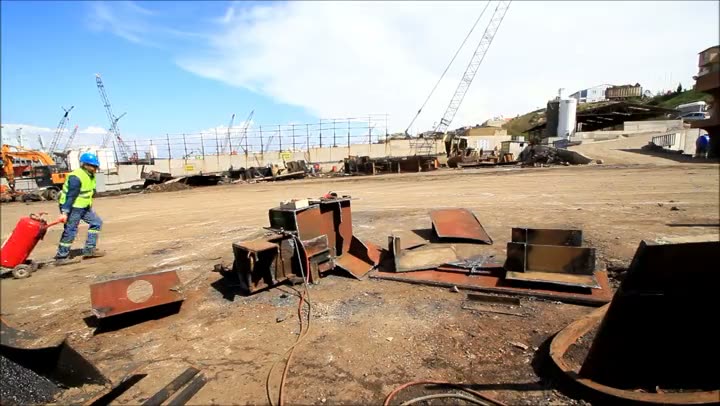
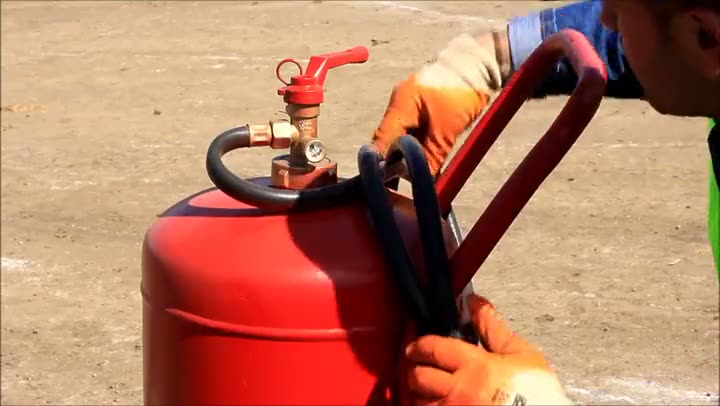
Fig. 01 Still from the first Subtilitas guide. Step 5, clear the area.
03 A worked example
The oxy cutter check where it started.
The first Subtilitas guide was made for a ship dismantling research project, to train crews on an oxy cutter. Each step had a short video filmed in the yard.
Try it the way a worker would. Each screen carries the video for that step, and the last one records the sign-off.
This is the original five-step check from 2023, shown to give you the idea. Our oxy-fuel cutting template is a fuller version you can adapt to your own procedure and risk assessment.
-
Oxy cutter checkStep 1 of 6
Dress for the job
Wear clean, heavy, flame-resistant work clothes with long sleeves to protect your arms. Wear a hi-vis vest in the yard.
-
Oxy cutter checkStep 2 of 6
Check the hoses
Make sure there are no cracks, holes or signs of wear, and that the hoses are free from oil and dirt.
-
Oxy cutter checkStep 3 of 6
Purge the hoses
Before you light the torch, quickly open and close the oxygen valve, then the fuel gas valve, to purge both hoses.
-
Oxy cutter checkStep 4 of 6
Preheat and cut
Heat the metal until it glows red-white. Pull the flame back a little and push down the valve lever to start the cutting oxygen.
-
Oxy cutter checkStep 5 of 6
Clear the area
When you have finished, clear the whole area.
-
Oxy cutter checkDone
Sign off
Tap to confirm you followed every step. Your name, the time and the guide version are saved, and sent to your manager when the phone has signal.
Something not right? Stop and tell your supervisor.
 Or scan this code to try it on your phone
04 Built for the job
Made for gloves, noise, bad light and no signal.
Big buttons at the bottom
Back and Next are large buttons fixed to the bottom of the screen, easy to hit in work gloves.
Works offline
Guides are saved on the phone, so they open in a ship's hold, a turbine tower or a basement plant room. Sign-offs upload when the signal comes back.
A photo or video on each step
Show the valve, the gauge reading or the locking pin instead of describing it.
In your crew's language
The app's buttons and menus come in English, Polish and Romanian, and you can write each guide in any of 18 languages.
Opens in the browser
There's no app store download, and each worker signs in once on their own phone.
Site tablets
Leave a tablet in the workshop. Workers pick their name from a list and enter a PIN if you want one.
| Guide | Done | Problem step | Review |
|---|---|---|---|
| Oxy-fuel cutting set-up | 64 | Step 8: purge order | Due Mar |
| MEWP pre-use check | 41 | None | Due Jun |
| Lockout on press line 3 | 18 | Step 6: hydraulic bleed | Overdue |
| Confined space entry | 7 | None | Due Jan |
Each sign-off keeps the worker's name, start and finish times, the machine and the guide version. The whole report exports to CSV.
05 The manager's view
See who did what, and which steps cause trouble.
- Sign-offs by site, guide, person and date, ready for an audit or a client visit.
- Problem steps: where people often go back, or take twice as long as usual. Fix the step or the photo and watch it change.
- A reminder when a guide is due for review, on a cycle you set.
- Every published version is kept, so an old sign-off still shows the steps that person saw.
Problem steps, review reminders and CSV export come with the Site plan. Starter includes the sign-off list.
06 Where it's used
For heavy industry, where a missed step hurts someone.
- MaintenanceIsolations, planned tasks and the jobs nobody does often enough to remember.
- DemolitionPlant pre-start checks, quick hitches and hot cutting, with crews that change every week.
- RenewablesTower, inverter and battery tasks on remote sites with no signal.
- ShipyardsHot work, enclosed spaces and crews who speak many languages. Where Subtilitas started.
- MachineryChangeovers, setting, cleaning and clearing blockages with the machine made safe.
07 Pricing
One price per site, with every worker included.
Agency staff and contractors use it at no extra cost, so there are no heads to count.
Starter
For one site getting started.
£149 a month per site, ex VAT
Or £1,490 a year, which is two months free.
- Up to 50 guides
- Unlimited workers and logins
- QR labels, offline use and a photo or video on every step
- Sign-off records
Site
For sites that need audit records or more than 50 guides.
£349 a month per site, ex VAT
Or £3,490 a year, which is two months free.
- Everything in Starter, with unlimited guides
- Problem steps and review reminders
- CSV export of every record
Extra sites cost 60% of the plan price. Every plan starts with a 30-day free trial with no card needed, and paying yearly gets you two months free. Prices exclude VAT. Full pricing and a price calculator
08 Questions
Questions people ask us.
Something else? Email [email protected] and we'll reply within one working day.
Do workers need to install an app?
No. Subtilitas opens in the phone's web browser, so there's nothing to download from an app store. Each worker signs in once, or you can leave a shared tablet on site where people pick their name.
Does it work without signal?
Yes. Guides are saved on the phone or tablet, so they open in places with no signal. Sign-offs are stored and sent when the device is back online.
Who writes the guides?
Your own people, because they know the machines and the site. You choose who can write and publish guides. Workers only see a guide once it's published, and every version is kept. Our free templates give you a starting point for common jobs.
Can agency and contract staff use it?
Yes. You pay per site, with no limit on workers or logins, so agency staff, subcontractors and visiting engineers cost nothing extra.
What languages does it work in?
The app's buttons and menus are in English, Polish and Romanian, and each worker picks their language. You can write a guide in any of 18 languages. If a guide isn't in your own first language, have someone fluent check it before you rely on it for a safety-critical step.
Does it replace our training, RAMS or permits?
No. It puts your procedure in front of the worker at the point of work. You still need your risk assessments, training, supervision and permit systems, and you're responsible for what your guides say.
Who can see our content?
Only your company. Each customer's guides, photos, videos and records are kept apart from every other customer's, and we only use them to run the service. Our data processing agreement sets this out.
What happens when the trial ends?
Choose a plan to carry on. Until you do, editing is paused, but your workers can still open and follow your guides.
Final step: sign off
Try it on one machine for 30 days.
Pick the job that goes wrong most often, put a guide on it and see what the records show after a month. You can start without a card.